<!-- googleoff: index -->
⚠️ v4.0 UI Transition Notice - In Process: The release of Total Launcher v4.0 has introduced significant user interface changes. Please note that this page does not yet reflect these updates. The new layout paths, folds, and visual maps are currently being compiled and will be deployed shortly.
<!-- googleon: index -->
Graphic Text Options
Dialog selections are discussed below the image. For navigation to an item make a selection in the Graphic Text Options image unless the “hoover ticker” indicates otherwise.
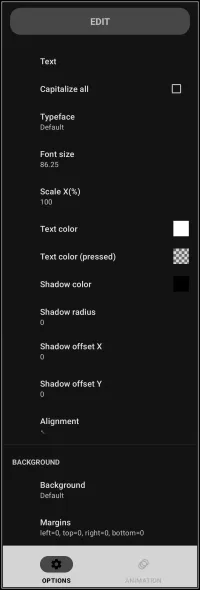
Graphic Text Options dialog. Make selection above.
- Text - Navigates to a dialog screen to enter static text or set the field to built-in contexts such as date/time, alarms, events, variables, and more.
- Capitalize all - All characters are capital format.
- Typeface - Select the installed fonts (serif, sans serif, or monospace) or install user-selected true type fonts (ttf). To install additional fonts resources, see Resources - Add.
- See the Typeface dialog here.
- Font size - Typeface size based on pixels.
- Scale X(%) - Change the width (X-axis) where 100%=normal, >100% = wider, or <100% = narrower.
- Text color - Color of the text being a static color or dynamic color keyed to the device's wallpaper.
- See the selection dialog here.
- If static color is selected, view the Color Picker dialog here.
- Text color (pressed) - The graphic text may have an action linked to it. If pressed (tapped) the text color will change to the selected color indicating activation. The default color is set to be transparent (ARGB# 00000000).
- Again, this color can be static or dynamic. This uses the same choice dialog as “Text color”,
- If static color is selected view the Color Picker as shown for “Text color”.
- Or if dynamic, view the dynamic color dialog as shown for “Text color”.
- Shadow color - Select a color for the object's shadow if desired.
- The same dialogs will appear for choices of static or dynamic color. See “Text color”.
- Shadow radius - If shadow color is selected, the radius represents the distance from the text body in pixels.
- Shadow offset X - X represents the x-axis direction of the shadow, with a positive number for right-side, a negative number for left-side, in pixels.
- Shadow offset Y - Y represents the y-axis directions of the shadow with a positive number for downward, a negative number for upward, in pixels.
- Alignment - Represents the positioning of the text within object' boundary space using a 9 point system:
- Think of a clock with the fulcrum of the hands being at center, the points 12, 1:30, 3, 4:30, 6, 7:30, 9, 10:30 designating the text positioning within the boundary.


- Background - Navigate to a dialog screen to choose the fill for the back of the text's boundary space.
- Margins - Navigate to a dialog screen to adjust how close the text is to the edge of each boundary space, in pixels.
- Animation - Navigate to a screen to choose animated options for the selected text.
===== Hidden Index Anchors ===== ui-graphic-selection-text-default-design_menu-background ui-graphic-selection-text-default-design_menu-margins ui-graphic-animation-no_exit { }
Comments & Feedback
Toby Lancer is ready to help! Look for the Quick Help form:
► Desktop: left sidebar located near the bottom for Private to Admin
► Mobile: 3-bar menu at page top.
► Use the Discussion section below to share any experiences and communications with other Total Launcher users.
► Any Registered User can directly update this and any wiki page if desired.
Moderation: To keep the manual clean, all comments are held for appropriateness review. Preview any comment before submitting it. It will not be displayed after submission until it is reviewed. So, please, do not resubmit.
Formatting: If using any code snippets, place them inside code tags (e.g., 'code') using double single quotes (') before and after to keep them readable.
Be Kind: This is a community effort. Please keep feedback constructive and on topic.
~~DISCUSSION~~