 Welcome to uiTLM! To join the community discussion or help build the manual, please register or log in.


Note: If currently registered and seeing this notice, check the “Remember me” box when logging in to stay recognized!
New Utility Release: uiTLM Arc Calculator
Eliminate the guesswork of Total Launcher's blind arc coordinates! Visualize, calculate, and copy exact Start and Sweep angles using an intuitive 12-hour clock model.
📱 Download: Get the standalone Android APK in the sidebar or test the interactive web tool ↗.
📖 Guide: Full workflow and parameter breakdown now live in the Shape Resources
Total Launcher v4 Update Announcement
An important update has arrived for Total Launcher, transitioning the Launcher to version 4. This update provides an overhauled interface, along with brand-new menu and layout structures, shapes, and graphical properties.
This is a community-driven, unofficial manual for the highly customizable Android Launcher, Total Launcher. The goal is to create a comprehensive resource for both new and experienced users.
Total Launcher + uiTotalLauncherManual (uiTLM)
 ➕
➕ 
Total Launcher is a home screen replacement for Android devices that provides users with extensive control over the layout, appearance, and functionality of the user interface. Its power lies in its flexibility in creating unique, personalized experiences far beyond the capabilities of standard launchers.
This flexibility to “Imagine it! Make it! The ultimate customization” also creates a knowledge requirement to realize each user's customization goals. Potential or new users will benefit greatly from initial setup and basic configuration after first installing the app. As you progress, uiTLM can help you understand and implement advanced features such as complex layouts, dynamic data, and sequences. If you get stumped in the middle of a creative effort, uiTLM can help you troubleshoot specific issues. Hopefully, many will seek us out for inspiration for new designs or to see how others have succeeded in documenting their knowledge.
A DokuWiki is a collaborative documentation platform that lets visitors view the knowledge base/content on a topic. The uiTotalLauncherManual is a community-driven project that functions as a central knowledge base. It collects and organizes information, tutorials, and best practices from the user community into a structured, easily searchable format. This ensures the information is practical, tested, and kept up to date by those who use the app most.
The community encourages every visitor to expand their knowledge by using uiTotalLauncherManual. Please visit the sections below on the Benefits of Registration and, hopefully, decide to Register with uiTLM. Welcome!
New to the wiki? Learn what can be gained and how to navigate this site by registering.
Click here.
Mobile Guests
☛ For Desktop Guests, see below. ☚
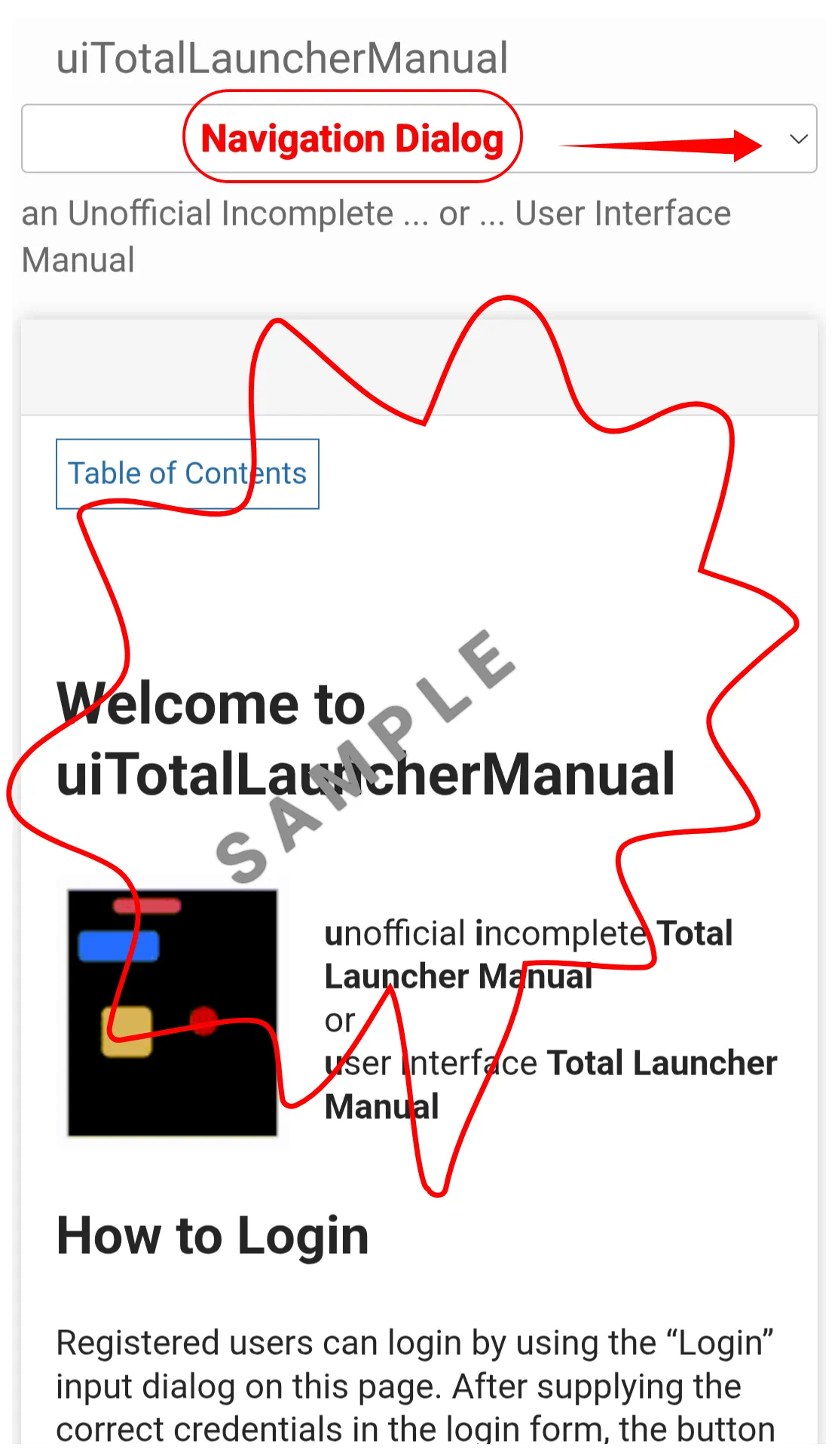
Self-registration is available to all visitors during their visit. To navigate, register, or sign in, go to the top of the device screen as shown in the image and description below.
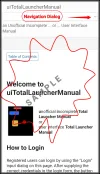
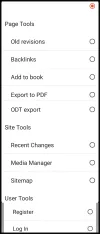 Click here
 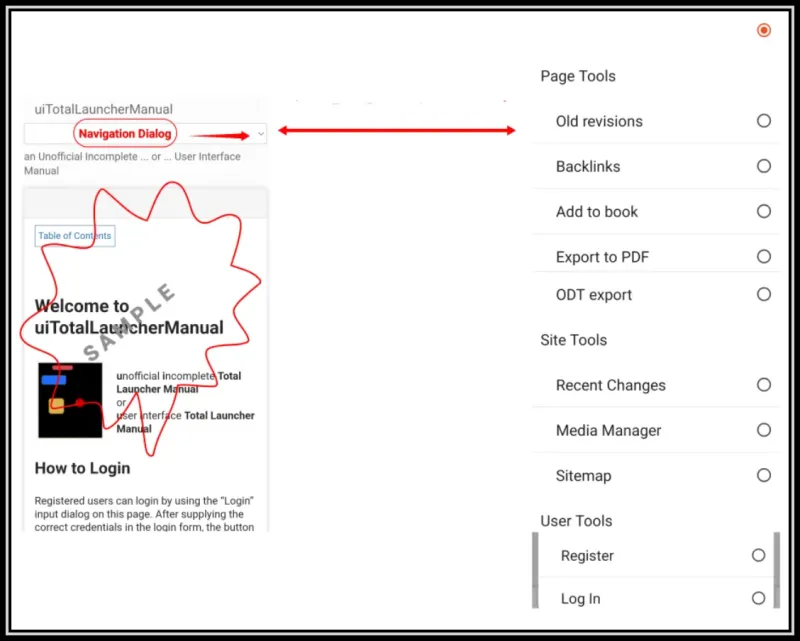 if in mobile portait mode to see an enlarged combined image on one screen.
• Center Image: The double-ended red arrow points to the empty dialog box on the left and the drop-down of the dialog selections on the right.
• Tap on either the left or right image to expand it for a more detailed view, then back out of that view to return here.
Mobile Navigation
The Mobile Navigation Dialog in the upper left corner of the page offers a drop-down navigation list which provides:
| Menu / Dialog | Visitor Status | DESCRIPTION |
| | Guest | REGISTERED | |
| ⚙️Page Tools⚙️ | | | |
| • Show pagesource | | ✔️ | Shows the page syntax used |
| • Edit Page | | ✔️ | Edit the current page. Posting may be delayed due to content and review processes. |
| • Old Revisions | | ✔️ | Date/time list of previous revisions. |
| • Backlinks | | ✔️ | Shows links back to the originating page. |
| • Manage Subscriptions | | ✔️ | Be notified of changes to the current page by email • per change or • per daily digest. |
| • Add to Book | | ✔️ | Current page is added to a queue for subsequent printing to the user's system printer or PDF. |
| • Export to PDF | | ✔️ | Current page or Book sent immediately to the user's system printer or PDF. |
| • Fold/unfold all | ✔️ | ✔️ | Page section may be hidden (folded) from normal view for readability reasons. “Unfold” or “Fold” all. |
| • ODT export | | ✔️ | Similar to “Export to PDF” this prepares and exports the page in Open Document Text format for a user's use in any device application supporting ODT, such as Microsoft Word, Google Docs, LibreOffice Writer and Apache OpenOffice Writer which supports rich text format. |
| • Return to top | | ✔️ | For long topics, the quickest way to return to the top of the page. |
| ⚙️Site Tools⚙️ | | | |
| • Recent Changes | | ✔️ | Date/time list of previous revisions. |
| • Media Manager | | ✔️ | Upload and change media/imagestor a wiki page. |
| • Stale the cache | | | An admin function for clearing the cache to refresh the page. |
| • Sitemap | | ✔️ | Displays the raw, filename-based contents of the namespaces (directories). Allows direct navigation to that location when the filename is selected. |
| ⚙️User Tools⚙️ | | | |
| • Update profile | | ✔️ | Register user's • Username • Real name • E-Mail • New password |
| • Register | ✔️ | | The gateway to becoming registered with this wiki. Registration provides greater wiki usability and privileges. |
| • Log In | | ✔️ | Log in if a registered user has not already done so.
• To eliminate the necessity to log in for each visit, a Registered user may select Remember me during any login and the wiki will not request Log In on subsequent visits. |
| • Log Out | | ✔️ | Leave the wiki |
Toby says 📣 Another Navigation Tip
Desktop Guests
Self-registration is available at this wiki. To do so, just click on the login  in the upper right corner of the screen to see a “Register” link (similar to the one in this login image to the right.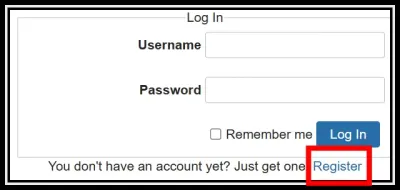
Enter the data requested (Username, Password, Real Name, E-Mail, and Math Solution). Tap Register.
Desktop Navigation
The left sidebar offers a persistent menu which provides:
3-Bar Menu (Upper Left)
| Menu / Dialog | Visitor Status | DESCRIPTION |
| | Guest | REGISTERED | |
| ⚙️Contact Us⚙️ | | ✔️ | A contact form handled by the wiki's Toby Lancer, uiTLM's helpful assissant who will direct any contact information to the correct wiki individual. |
| ⚙️Table of Contents⚙️ | | ✔️ | A curated list of topics by category: • Early Learning • Who, What, When, and Where • ui - User Interface Demo • App Reminders • Common Issues |
| ⚙️Quick Help⚙️ | | ✔️ | Another Toby Lancer direct handling by topic of information any user wishes to convey: • Bug • Typo • Suggestion • Question • Other |
| ⚙️Site Tools⚙️ | | ✔️ | |
| • Recent Changes | | ✔️ | Date/time list of previous revisions. |
| • Media Manager | | ✔️ | Upload and change media/imagestor a wiki page. |
| • Stale the cache | | | An admin function for clearing the cache to refresh the page. |
| • Sitemap | | ✔️ | Displays the raw, namespace/pagename-based contents of the wiki (directories). Allows direct navigation to that location when you select the namespace/pagename. |
| ⚙️User Tools⚙️ | | ✔️ | |
| • Update Profile | | ✔️ | Register user's • Username • Real name • E-Mail • New password |
| • Admin | | | Reserved for administrative functions. |
| • Log Out | | ✔️ | Leave the wiki. |
| ⚙️Last Visited Pages⚙️ | | ✔️ | A breadcrumb trail of the last 10 pages visited. A great “Take me back!” |
Registration will significantly improve the visitor experience on the uiTotalLauncherManual wiki with an easy step toward registration. To learn more:
Click here:
Improved Navigation Aids:
**Backlinks**, which are links that can be used to retrace steps to the originating page.
Table of Contents in the floating left sidebar
Sitemap of the wiki namespaces and their filenames … jump directly to any page which might contain the information desired
Search dialog for any term reveals • any Page Title or • or page which contains the searched term
Printing Aids:
Subscribe to Updates:
Quick Help to questions directed to Toby Lancer (uiTLM assistant)
Contribute to the uiTLM wiki:
Remember Me feature availability when return visits will not require a password
Presence and participation all boil down to a community group with a common desire to create an ** easier ** route through the learning curve of Total Launcher, the application each of us uses, or for potential users or those just starting out.

 ➕
➕ 


Comments & Feedback
Toby Lancer is ready to help! Look for the Quick Help form:
► Desktop: left sidebar located near the bottom for Private to Admin
► Mobile: 3-bar menu at page top.
► Use the Discussion section below to share any experiences and communications with other Total Launcher users.
► Any Registered User can directly update this and any wiki page if desired.
Moderation: To keep the manual clean, all comments are held for appropriateness review. Preview any comment before submitting it. It will not be displayed after submission until it is reviewed. So, please, do not resubmit.
Formatting: If using any code snippets, place them inside code tags (e.g., 'code') using double single quotes (') before and after to keep them readable.
Be Kind: This is a community effort. Please keep feedback constructive and on topic.
~~DISCUSSION~~