meta data for this page
Translations of this page:
- en
<!-- googleoff: index -->
⚠️ v4.0 UI Transition Notice - In Process: The release of Total Launcher v4.0 has introduced significant user interface changes. Please note that this page does not yet reflect these updates. The new layout paths, folds, and visual maps are currently being compiled and will be deployed shortly.
<!-- googleon: index -->
Mixed Graphic - Time/Event Edit
Dialog selections are discussed below the image. For navigation to an item make a selection in the Mixed Graphic - Time/Event Edit image.
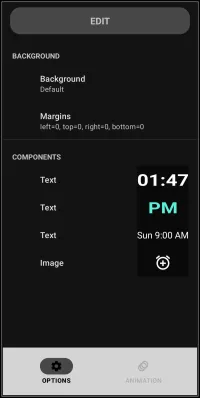
Mixed Graphic - Time/Event Edit dialog. Make selection above.
- Background - Select to show the Background dialog and the categories which could be modified
- Time - Select to show the text options dialog for the elements of the digital time
- PM - Select to show the text options dialog for the element of this time indicator
- Event - Select to show the text options dialog for the element of this calendar event
- Image (clock/alarm) - Select to show the options dialog for the elements of the image for the clock/alarm
Other observatins on this image are:
- Margins - This margins settings indicate no margins have been set. The dialog would be similar to the one shown here.
===== Hidden Index Anchors ===== ui-generic-background ui-graphic-text ui-object-edit-option-image
Comments & Feedback
Toby Lancer is ready to help! Look for the Quick Help form:
► Desktop: left sidebar located near the bottom for Private to Admin
► Mobile: 3-bar menu at page top.
► Use the Discussion section below to share any experiences and communications with other Total Launcher users.
► Any Registered User can directly update this and any wiki page if desired.
Moderation: To keep the manual clean, all comments are held for appropriateness review. Preview any comment before submitting it. It will not be displayed after submission until it is reviewed. So, please, do not resubmit.
Formatting: If using any code snippets, place them inside code tags (e.g., 'code') using double single quotes (') before and after to keep them readable.
Be Kind: This is a community effort. Please keep feedback constructive and on topic.
~~DISCUSSION~~